
Go to Sales > Order History.
Order History provides a complete overview of all orders processed through your e-commerce platform, including both store purchases and club shipments, all in one place for easy tracking and management.

This screen provides detailed information about your orders. In the action menu, you can access the complete order for further details.
Printing Packing Slips & Invoices
From the Order History page, you can select multiple orders and print packing slips or invoices using the Action menu.
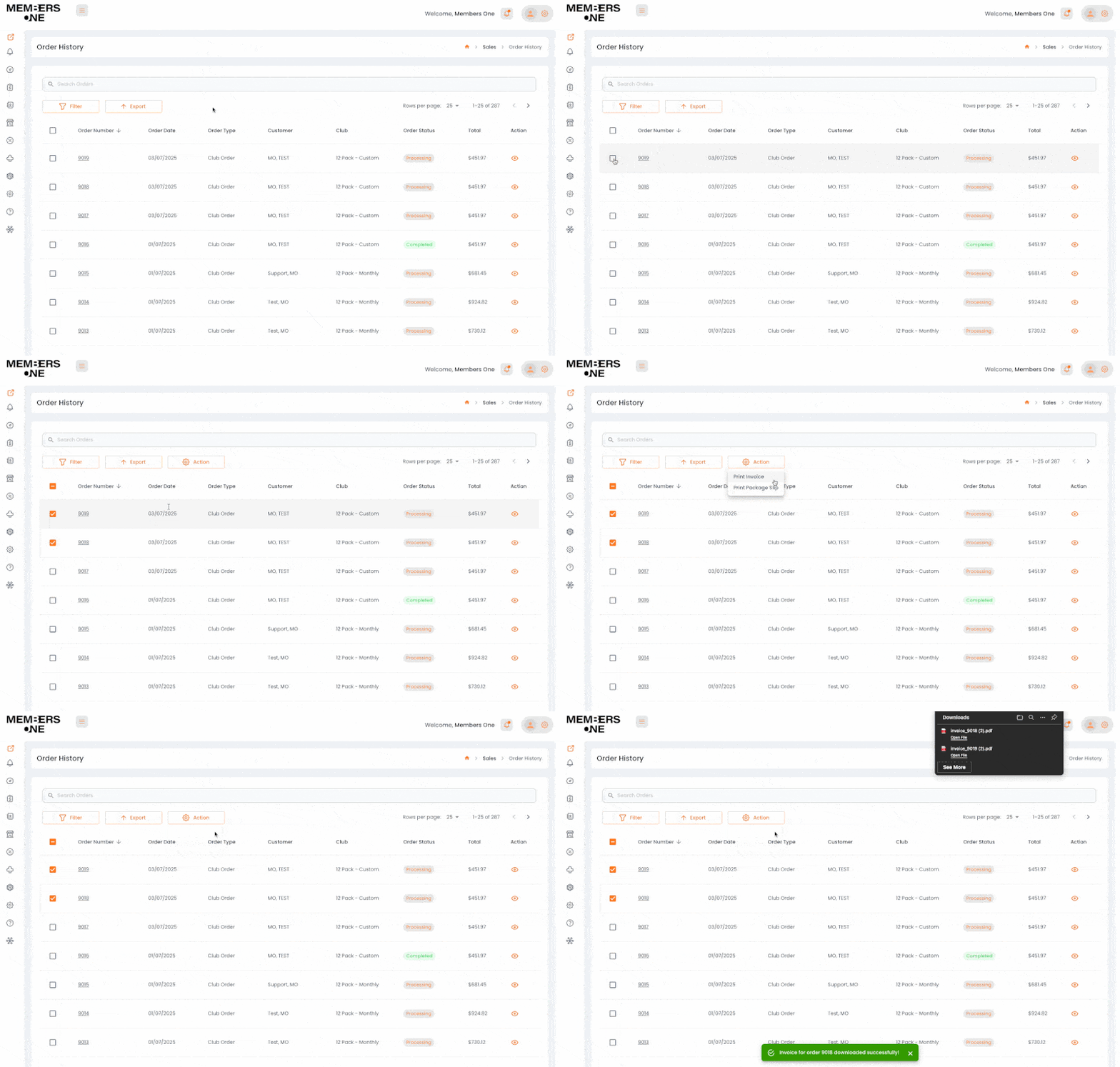
You can also print a packing slip or invoice from the individual order view. To do this, select:
View Order > Burger Menu > Print Packing Slip or Invoice
View An Order
Go to Sales > Order History > Action.
If you wish to view even more information attached to an order, please view the order in the actions menu.

Refunds
From Members One, you can easily process refunds for club orders. To do so, navigate to Sales > Order History > View Club Order, then scroll down to locate the Refund Button.
Please be aware that only club orders can be refunded directly through Members One. If you need to refund standard store orders, this must be done via your eCommerce Platform.

Once you select the refund button on a club order, you can proceed to process your refund. You will need to enter the quantities for each product, specify the discount to be refunded (which will be automatically calculated based on the quantities you enter), the shipping refund amount, the reason for the refund, and any items being returned to stock. Additionally, you can choose to send a notification to the customer. After filling in all these details, simply select “Process Refund” to complete the transaction.
Read our step-by-step guide to processing a refund.
Order History List Table
Below is a table of list page items and their functions.
| Field | Description |
|---|---|
| Order number | Each order has a unique number assigned to it for identification. |
| Order Date | This is the date when the order was placed or processed. |
| Order type | This tells you what channel the order was placed and processed through. |
| Customer Name | The first and last name of the customer who placed the order. |
| Club Name | The name of the club a member belongs to. |
| Order Status | Order Status tells you if the order is processed, pending, completed, cancelled, on hold. |
| Shipping Status | This tells you the current status of the order, whether it is sent to fulfilment, shipped, handled externally or picked up. |
| Order Total | Total dollar value of the order. |
| Action | Lets you view the order. |
Order Products List Table
Below is a table of list page items and their functions.
| Field | Description |
|---|---|
| Product Number | Order Number from your e-commerce store. |
| Product Name | Name of a product. |
| SKU | The SKU of the product. |
| Quantity | Number of products purchased. |
| Price | The price of a single product. |
| Total | The price of the product line is for multiple or single purchases. |
| Sub Total | (product count) Total retail of all products purchased. |
| Discount | The club discount. |
| Shipping | The shipping amount applied to the order |
| Tax | Total tax for this order. |
| Total | The total dollar value of this order. |